Showing posts with label KeywordResearch. Show all posts

Friday, June 20, 2025

What is SEO? Types, Tools, Keywords & Scope Explained Simply

June 20, 2025 0

 What is SEO?

SEO stands for search engine optimization - the process of improving the content and structure of your website so that it ranks higher in search engine results (such as Google). The better your SEO, the more people will find your site organically (without having to pay for ads).


⚙️ Types of SEO you should know

On-page SEO – optimizing content, meta tags, images, internal links.

Off-page SEO – backlinks, guest posting, social signals.

Technical SEO – page speed, mobile-friendliness, crawlability.

Local SEO – ranking for location-based searches (great for local businesses).

🔑 What Are Keywords?

Keywords are the terms people search for in Google.
Example: “how to start a blog” – this is a keyword.

Here many type of keywords like:

  • Short-Tail Keywords (Head Keywords)
  • Long-Tail Keywords
  • LSI Keywords (Latent Semantic Indexing)
  • Branded Keywords
  • Non-Branded Keywords
  • Commercial/Transactional Keywords
  • Informational Keywords
  • Navigational Keywords
  • Geo-Targeted (Local) Keywords
  • Competitor Keywords

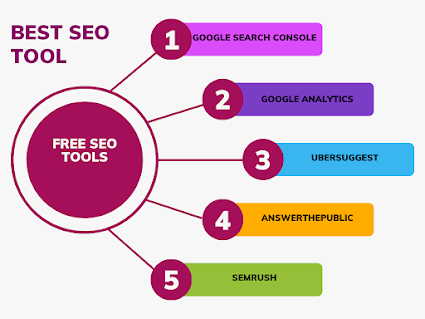
🧰 Top Free SEO Tools for Beginners

  • Google Search ConsolePerformance tracking
  • Google AnalyticsUnderstand user behavior
  • UbersuggestKeyword research
  • AnswerThePublicQuestion-based keyword ideas
  • SEMrush (Free Tools)Audit, keyword checker, backlinks


🌟 Why SEO is Important?

  • Helps bring free traffic
  • Increases trust and visibility
  • Builds long-term growth
  • A must for every blog, business, or content creator

Frequently Asked Questions (FAQ)

Question 1. Do I need coding to do SEO?

No! Most SEO can be done with basic tools and content strategies. Coding helps in technical SEO but it is not necessary for beginners.

Question 2. How long does SEO take to work?

👉 SEO results usually appear in 3-6 months depending on your niche, content quality, and competition.

Question 3. What are backlinks?

👉 Backlinks are links from other websites to your site. They act as a “vote of confidence” in SEO.

Question 4. How often should I do SEO?

👉 SEO is continuous. You should update content regularly, track keywords monthly, and monitor performance weekly.

Question 5. Can I do SEO for free?

👉 Yes! Many powerful SEO tools, like Google Search Console, Ubersuggest, and AnswerThePublic, are free.

Thanks for reading! If you’d like to get SEO done professionally, visit my Fiverr profile — I’m here to help.
👉 SEO Freelancing


We hope this guide helped you understand the basics of SEO. Keep learning, keep optimizing!

Wednesday, June 18, 2025

One Tool, All SEO: How I Manage Keywords, Content & Backlinks Easily

June 18, 2025 0

  Are you a blogger, freelancer site audit, or digital marketer tired of jumping between multiple SEO tools?

Or maybe you’re just starting out and confused about how to handle keywords, backlinks, audits, and content all in one place?

You’re not alone.

I was there too – until I found an all-in-one SEO tool that changed the game. In this blog, I’ll share how I simplified SEO by using just one powerful platform, why it works, and how you can try it for free today!


🌐 Why SEO Will Rule Even in 2025

Let’s get real — you can’t rely on social media traffic alone. One algorithm change and bang 💥, your traffic drops. But SEO traffic is organic, consistent, and long-term.

Here’s why SEO still matters:

  • 90% of online experiences start with search engines
  • Ranking on page 1 = more visibility + more traffic + more revenue
  • SEO builds authority over time — not overnight, but it’s worth it!


🧩 The 3 Biggest SEO Challenges (and a Solution)


Most beginners (including me!) face the same SEO problems:
  • Keyword research is confusing 😵
  • Competitive analysis is hard without tools
  • Backlink tracking always takes time
  • Writing content for SEO? Even harder!
But now I handle it all using one tool: SEMrush — and here’s how.

🛠️ Best Tools for SEO in 2025

Tool                                 Purpose

Google Search Console
                                    Track site performance
Ubersuggest                                    Basic keyword ideas
AnswerThePublic                                    Content ideas
SEMrush ⭐                                    All-in-one SEO suite
Screaming Frog                                   Technical SEO audit

✅ Why I chose SEMrush (my honest experience)


After trying several free and paid tools, SEMrush turned out to be:

  • The most complete
  • The easiest to use
  • And the most helpful as a beginner and freelancer

With SEMrush, I can:

  • Find high-volume, low-competition keywords
  • Spy on competitors’ top traffic pages
  • Get backlink suggestions
  • Fix site issues in one click
  • Optimize blog content with a real-time SEO writing assistant
  • Track your rankings every week

💬 “SEMrush helped me write better blogs, find the right keywords, and increase traffic by 5x in just a few months.”

🧠 How to use SEMrush in 4 easy steps

Here’s a simple way to get started with SEMrush:

✅ Step 1: Sign up for a 7-day free trial
👉 Click here: SEMrush Official website 

✅ Step 2: Use the Keyword Magic Tool
Search for any topic you want to write about and get keyword ideas based on volume, difficulty, and trending.

✅ Step 3: Analyse competitors
Enter your competitors’ domain and instantly see which keywords, backlinks, and blogs bring them traffic.

✅ Step 4: Use the SEO Writing Assistant
Write or edit your blog while getting real-time SEO scores, keyword suggestions, and readability tips.

Boom 💥! You’re now optimizing like a pro – no guesswork, no confusion.

🌟 Who should use SEMrush?

  • Bloggers who want more organic traffic
  • Freelancers doing SEO for clients
  • Small business owners managing DIY websites
  • Content writers and creators who want ranked content
  • Digital marketers looking to grow a brand online


🙋‍♀️ FAQ 


Q. Is SEMrush good for absolute beginners?

👉 Yes! It has a clean dashboard, tutorials, and guided SEO templates for beginners.

Q. What does SEMrush cost?

👉 It offers a 7-day free trial, after which premium plans are available. But try it first — no risk!

Q. Do I need technical knowledge to use SEMrush?

👉 No coding required! Just type in your domain or keywords, and SEMrush will guide you.

Q. Can I use SEMrush for multiple websites?

👉 Yes, you can add multiple projects and track them separately.

Q. Will I also get backlink ideas?
👉 Yes, SEMrush provides a backlink gap report — it shows where your competitors are getting links and how you can get one too.